Whack a mole
8 min readThe background radiation of the internet
I’ve been doing web-development for about 9 years. I’ve written many back-ends, front-ends and designed databases. But I’ve never had much experience with actually setting up a real, public server, meant for public connectivity. The deployments and server setup and procurement were always handled by someone else. This blog is the first time I’ve set up a personal site, hosted on a personal VPS.
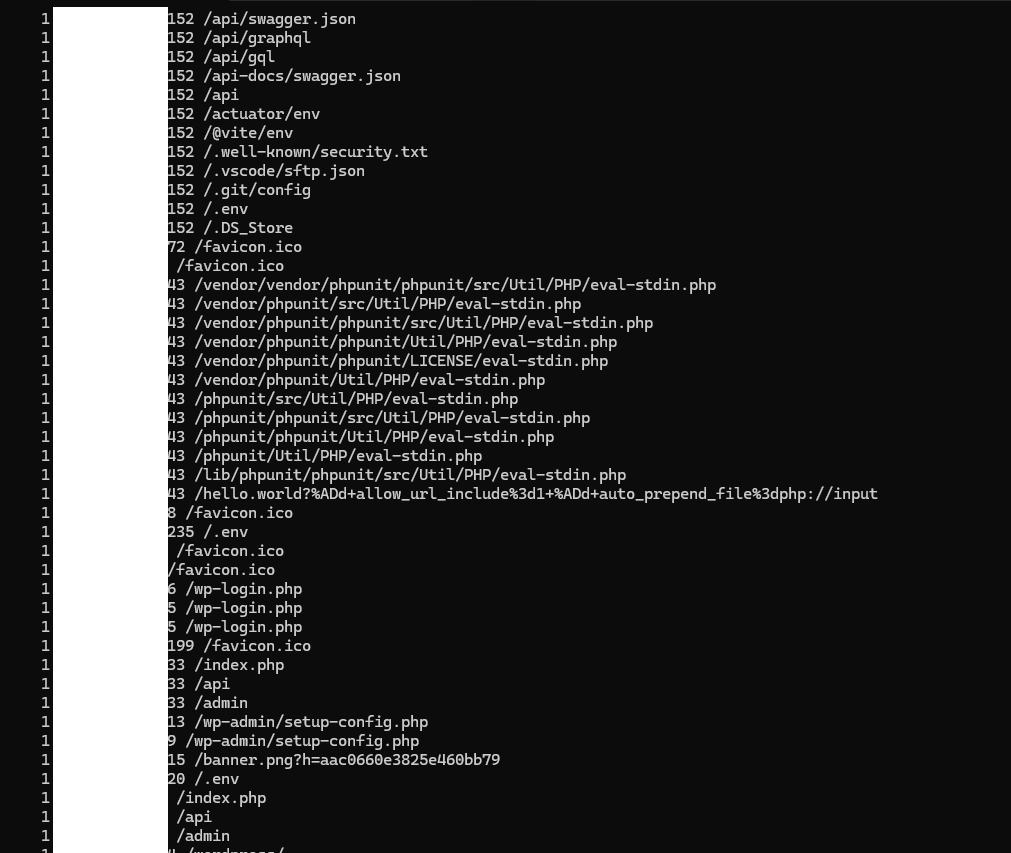
The first thing I did when I purchased the VPS instance of course was take care of security. I have configured firewall rules and set up fail2ban. Basic stuff. But the basic guides only tell you about how to protect against brute force ssh attacks. But there are other kinds of attacks. I’ve seen this phenomena be referred to as “the background radiation of the internet”. An army of bots running on various servers, compromised devices, state infrastructure and others scanning for vulnerabilities against all IP addresses and all ports, all the time, never sleeping, unrelenting, trying to do brute force attacks against exposed wordpress admin pages, looking for misconfigured servers that serve .env files or other secrets, etc. In short, a botnet.
There is no hiding for this. They just non-stop hammer all IPs, it doesn’t matter if there’s something on the other side or not. The moment the VPS was online, in the 5 minutes it took me to set up fail2ban I already had 6 failed ssh attempts. Fortunately AWS uses keys for ssh not simple passwords so good luck with that.
Still, it might be because I’m just starting out so I’m full of energy and motivated about this, so I thought: I wonder what I can find if I take a look at what can an attacker’s IP address tell me. So I just google it, and to my surprise it wasn’t some IP from the east of eurasia, it was a an ip address coming from a DigitalOcean data center. So I submitted an abuse report to them, with the offending IP address and the fail2ban log entry. They responded very promptly, in just a few hours that they have terminated the offending account. A few hours later, I find another one, so I submit another report and again they responded very promptly. Great people over there.
I let the night pass and the next day I check my fail2ban jails, and I have like 20 banned IPs in my jails. I check the first one and this is not a Digital Ocean IP. This one is coming somehow from behind cloudflare, and there’s 19 other IPs I have to check, so I think, alright, this would be the perfect time to automate this. There is no shame in admitting that for quick and dirty scripts like this AI seems like the perfect tool for the job. So initially I ask it to write a quick python script to do the lookups for a given list of IP addresses. Of course it one shotted it.
I then look trough the resulting table and I see a lot of IPs from Cloudflare networks. So I go ahead to their abuse report form and the first issue is, unlike DigitalOcean, they do not have a category for botnets. Does it fit under Malware/Phishing? No, not really, it’s not sexually explicit stuff either. So I guess I go under General. The first issue, they require an URL for the offending site, so I just write in plain text there is no url. No, of course they validate the URLS, so I go ahead and write thereisnourlforthis.com (I hope this isn’t someone’s site). I then paste all the IP addresses in the source Ip address field and now I have to gather logs for each IP address. I started doing it manually by grepping through the logs, but after I do it 3 times I realize I’m a dingus, and this also should be automated. So I had Codex 5.3 write a shell script for me which pulls the banned IPs from the jails, queries them and then outputs a CSV report so that I can take the evidence to various providers for the purposes of abuse reporting.
The final report looks something like this:
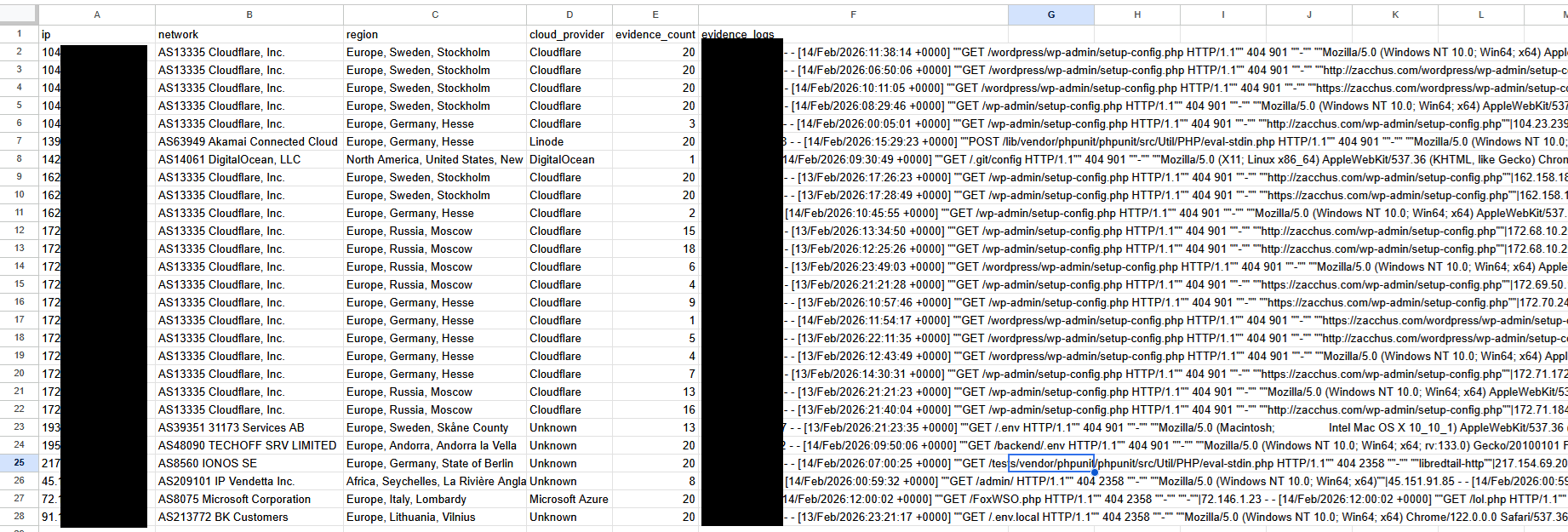
So having the well-correlated data from the automated CSV report I finish the abuse report to cloudflare. And I get a generic email reply as well as a disclaimer that this might be the only email about this and how, as they are not a hosting provider, they can not do much about the report but forward it. This seems very weird to me, because even though they are not directly hosting the bots, the bots that pass trough cloudflare must be somehow associated with an account, right? Pretty disappointing attitude about it.
This game of whack-a-mole is probably not something us honest server admins can win. But I do feel a small amount of dopamine when I get the report that an abusing account has been shutdown due to my report.
Steal my setup
Getting a single botting account banned is not much in the grand scheme of things, but if you’re interested in how to setup something similar here’s how I have things configured.
Now one of the best things you can do to prevent unwanted ssh attempts is to setup a firewall rule for you server such that you can only connect from a static IP that is yours. Unfortunately I do not have that luxury from my ISP provider so I can’t use that. There is always the option to setup a VPN, that can also increase security in that regard, but I won’t get into that.
The first step would be to install fail2ban. Depending on exactly what kind of linux distribution you have it might be something like
sudo apt install fail2ban -y
Then you can start the service with
sudo systemctl enable fail2ban
sudo systemctl start fail2ban
Then you’ll need to define jails. You can do that by defining a jail.local file as editing the main file might get it overwritten by updates.
sudo nano /etc/fail2ban/jail.local
# this is the default config, these are sort of like global config values which
# can be overriden in other jail definitions
[DEFAULT]
# Ban for 1 hour
bantime = 3600
# Watch window of 10 minutes
findtime = 600
# Ban after 3 failures
maxretry = 3
# Use systemd for log reading
backend = systemd
# You can setup an ip range to be ignored so that fail2ban does
# not ban local running services that might be communicating over tcp

ignoreip = 127.0.0.1/8 ::1 172.16.0.0/12

[sshd]
enabled = true
port = ssh
filter = sshd
# it might be tempting to make this 1 but you might mistype
# the key path once and then you're screwed
maxretry = 3

# same, you might be tempted to make this longer,
# but you do not want it biting you in the ass
bantime = 3600

# here we define a custom jail, this is for catching
# automated bots that scan for vulnerabilities
[jail-botscan]
enabled = true
# this is important if the logs are not
# coming from systemd but are instead written to some custom location
backend = polling
port = http,https
# the name of the defined filter that will be applied to
# the logs to scan for failures that get counted in order to
# move ips into the jail
filter = filter-botscan
logpath = <PATH OF LOG TO BE SCANNED>
maxretry = 2
findtime = 300
bantime = 86400

# this one is a 404 jail which is not that important
# but it can tell misconfigured crawlers to piss off
# (i've seen some in the logs that poorly concatenate URLs)
[jail-404]
enabled = true
backend = polling
port = http,https
filter = filter-404
logpath = <PATH OF LOG TO BE SCANNED>
# More lenient — legit users might hit a 404 occasionally
maxretry = 10
findtime = 600
# Ban for 1 hour
bantime = 3600
Then you’ll need to define the filters:
First filter-botscan:
sudo nano /etc/fail2ban/filter.d/filter-botscan.conf ```
[Definition]
failregex = ^
It's basically just a regex that looks for common shit exploit scanner bots are looking for

Then filter-404

```bash
sudo nano /etc/fail2ban/filter.d/filter-404.conf
[Definition]
failregex = ^<HOST> .* "[^"]*" 404
ignoreregex = "(GET|HEAD) /(favicon\.ico|robots\.txt|apple-touch-icon)[^"]*" 404
This is just a regex for 404s, with some exceptions for some common things that might be expected for the server to serve but it does not because I haven’t bothered to add them yet. Now depending on your use case you might not need this one at all, but this does also serve as a secondary net for botscans that do not fall into the initial botscan filter.
Now you’ll need to restart fail2ban so the config is accounted for
sudo systemctl restart fail2ban
You can now check fail2ban status to see if the jails are properly setup
sudo fail2ban-client status
You should see a report that looks roughly like this:

You can also see a detailed report per jail by running something akin to
sudo fail2ban-client status jail-botscan
And the report should look something like this:

Should you want to test the filters against existing logs you can run something akin to:
sudo fail2ban-regex <YOUR LOG PATH HERE> /etc/fail2ban/filter.d/filter-botscan.conf
You can check its output to verify it’s actually finding stuff in your logs. If you know there are things in the logs you want to catch, you might need to update the filter regex.
Having all this setup you can now use an automated shell script that looks into the jails and queries the banned IPs and generates a nice CSV report for you to look at:
Disclaimer: The following script has been vibecoded with AI. I know many programming languages, but bash is not one of them. Because it’s a one off thing, I wanted it to be something with no external dependencies so you can run it without having to install python or anything else.
#!/usr/bin/env bash

set -euo pipefail

LOG_FILE="<path to your log file>"
OUTPUT_FILE=""
EVIDENCE_REGEX=" 404 "
MAX_EVIDENCE_LINES=20
declare -a JAILS=(sshd jail-404 jail-botscan)

usage() {
  cat <<'EOF'
Usage:
  ./scripts/fail2ban_abuse_report.sh [options]

Options:
  --log-file PATH         log path
                         (default: <path to you log file>)
  --evidence-regex REGEX  Regex used to filter evidence lines from log
                         (default: " 404 ")
  --max-evidence N        Max matching log lines saved per IP (default: 20)
  --jail NAME             Fail2Ban jail to read (repeatable). If omitted, all jails.
  --output PATH           CSV output path
                         (default: ./abuse_report_YYYYmmdd_HHMMSS.csv)
  -h, --help              Show help

Output CSV columns:
  ip,network,region,cloud_provider,evidence_count,evidence_logs

Dependencies:
  fail2ban-client, curl, jq, grep, awk, sed
EOF
}

require_cmd() {
  local cmd="$1"
  if ! command -v "$cmd" >/dev/null 2>&1; then
    echo "Missing dependency: $cmd" >&2
    exit 1
  fi
}

csv_escape() {
  local value="$1"
  value=${value//$'\r'/ }
  value=${value//$'\n'/ }
  value=${value//\"/\"\"}
  printf '"%s"' "$value"
}

parse_args() {
  while [[ $# -gt 0 ]]; do
    case "$1" in
      --log-file)
        LOG_FILE="$2"
        shift 2
        ;;
      --evidence-regex)
        EVIDENCE_REGEX="$2"
        shift 2
        ;;
      --max-evidence)
        MAX_EVIDENCE_LINES="$2"
        shift 2
        ;;
      --jail)
        JAILS+=("$2")
        shift 2
        ;;
      --output)
        OUTPUT_FILE="$2"
        shift 2
        ;;
      -h|--help)
        usage
        exit 0
        ;;
      *)
        echo "Unknown option: $1" >&2
        usage >&2
        exit 1
        ;;
    esac
  done
}

get_all_jails() {
  fail2ban-client status 2>/dev/null \
    | awk -F: '/Jail list/ {print $2}' \
    | tr ',' '\n' \
    | sed 's/^ *//;s/ *$//' \
    | sed '/^$/d'
}

get_banned_ips_from_jail() {
  local jail="$1"
  fail2ban-client status "$jail" 2>/dev/null \
    | awk '
        /Banned IP list/ {capture=1}
        capture {print}
      ' \
    | grep -Eo '([0-9]{1,3}\.){3}[0-9]{1,3}|([0-9A-Fa-f:]{2,})' \
    | sed 's/^[[:space:]]*//;s/[[:space:]]*$//' \
    | sed '/^$/d' || true
}

is_valid_ip() {
  local ip="$1"
  [[ "$ip" =~ ^([0-9]{1,3}\.){3}[0-9]{1,3}$ || "$ip" == *:* ]]
}

infer_cloud_provider() {
  local haystack
  haystack=$(printf '%s' "$1" | tr '[:upper:]' '[:lower:]')

  if [[ "$haystack" == *"cloudflare"* ]]; then
    printf 'Cloudflare'
  elif [[ "$haystack" == *"amazon"* || "$haystack" == *"aws"* ]]; then
    printf 'Amazon Web Services'
  elif [[ "$haystack" == *"google"* || "$haystack" == *"gcp"* ]]; then
    printf 'Google Cloud'
  elif [[ "$haystack" == *"microsoft"* || "$haystack" == *"azure"* ]]; then
    printf 'Microsoft Azure'
  elif [[ "$haystack" == *"digitalocean"* ]]; then
    printf 'DigitalOcean'
  elif [[ "$haystack" == *"oracle"* ]]; then
    printf 'Oracle Cloud'
  elif [[ "$haystack" == *"hetzner"* ]]; then
    printf 'Hetzner'
  elif [[ "$haystack" == *"ovh"* ]]; then
    printf 'OVHcloud'
  elif [[ "$haystack" == *"linode"* || "$haystack" == *"akamai"* ]]; then
    printf 'Linode'
  elif [[ "$haystack" == *"vultr"* || "$haystack" == *"choopa"* ]]; then
    printf 'Vultr'
  else
    printf 'Unknown'
  fi
}

lookup_ip_info() {
  local ip="$1"
  local response
  local api_url="http://ip-api.com/json/${ip}?fields=status,message,country,regionName,continent,as,org,isp,query"

  if ! response=$(curl -fsS --max-time 12 "$api_url" 2>/dev/null); then
    printf 'Lookup failed|Unknown|Unknown'
    return
  fi

  local status
  status=$(jq -r '.status // "fail"' <<<"$response")
  if [[ "$status" != "success" ]]; then
    printf 'Lookup failed|Unknown|Unknown'
    return
  fi

  local asn org isp network continent country region region_text provider
  asn=$(jq -r '.as // ""' <<<"$response")
  org=$(jq -r '.org // ""' <<<"$response")
  isp=$(jq -r '.isp // ""' <<<"$response")

  network="$asn"
  if [[ -z "$network" ]]; then network="$org"; fi
  if [[ -z "$network" ]]; then network="$isp"; fi
  if [[ -z "$network" ]]; then network="Unknown"; fi

  continent=$(jq -r '.continent // ""' <<<"$response")
  country=$(jq -r '.country // ""' <<<"$response")
  region=$(jq -r '.regionName // ""' <<<"$response")
  region_text=$(printf '%s, %s, %s' "$continent" "$country" "$region" | sed 's/, ,/, /g; s/, $//; s/^, //')
  if [[ -z "$region_text" ]]; then
    region_text="Unknown"
  fi

  provider=$(infer_cloud_provider "$asn $org $isp")
  printf '%s|%s|%s' "$network" "$region_text" "$provider"
}

collect_evidence() {
  local ip="$1"
  local matches

  matches=$(grep -F "$ip" "$LOG_FILE" 2>/dev/null | grep -E "$EVIDENCE_REGEX" 2>/dev/null | tail -n "$MAX_EVIDENCE_LINES" || true)
  if [[ -z "$matches" ]]; then
    printf '0|'
    return
  fi

  local count compact
  count=$(printf '%s\n' "$matches" | sed '/^$/d' | wc -l | awk '{print $1}')
  compact=$(printf '%s\n' "$matches" | sed 's/"/""/g' | tr '\n' '|' | sed 's/|$//')
  printf '%s|%s' "$count" "$compact"
}

main() {
  parse_args "$@"

  require_cmd fail2ban-client
  require_cmd curl
  require_cmd jq
  require_cmd grep
  require_cmd awk
  require_cmd sed

  if [[ ! -f "$LOG_FILE" ]]; then
    echo "Log file not found: $LOG_FILE" >&2
    exit 1
  fi

  if ! [[ "$MAX_EVIDENCE_LINES" =~ ^[0-9]+$ ]] || [[ "$MAX_EVIDENCE_LINES" -lt 1 ]]; then
    echo "--max-evidence must be a positive integer" >&2
    exit 1
  fi

  if [[ -z "$OUTPUT_FILE" ]]; then
    OUTPUT_FILE="abuse_report_$(date +%Y%m%d_%H%M%S).csv"
  fi

  local -a source_jails=() banned_ips=()
  if [[ ${#JAILS[@]} -gt 0 ]]; then
    source_jails=("${JAILS[@]}")
  else
    mapfile -t source_jails < <(get_all_jails)
  fi

  if [[ ${#source_jails[@]} -eq 0 ]]; then
    echo "No fail2ban jails found." >&2
    exit 1
  fi

  local jail
  for jail in "${source_jails[@]}"; do
    while IFS= read -r ip; do
      if [[ -n "$ip" ]] && is_valid_ip "$ip"; then
        banned_ips+=("$ip")
      fi
    done < <(get_banned_ips_from_jail "$jail")
  done

  if [[ ${#banned_ips[@]} -eq 0 ]]; then
    echo "No banned IPs found in selected fail2ban jails." >&2
    exit 0
  fi

  mapfile -t banned_ips < <(printf '%s\n' "${banned_ips[@]}" | sort -u)

  {
    printf '%s\n' 'ip,network,region,cloud_provider,evidence_count,evidence_logs'

    local ip lookup network region provider evidence count logs
    for ip in "${banned_ips[@]}"; do
      lookup=$(lookup_ip_info "$ip")
      IFS='|' read -r network region provider <<<"$lookup"

      evidence=$(collect_evidence "$ip")
      IFS='|' read -r count logs <<<"$evidence"

      printf '%s,%s,%s,%s,%s,%s\n' \
        "$(csv_escape "$ip")" \
        "$(csv_escape "$network")" \
        "$(csv_escape "$region")" \
        "$(csv_escape "$provider")" \
        "$(csv_escape "$count")" \
        "$(csv_escape "$logs")"
    done
  } >"$OUTPUT_FILE"

  echo "Wrote abuse report CSV: $OUTPUT_FILE"
  echo "IPs processed: ${#banned_ips[@]}"
}

main "$@"
Happy reporting!
Possible improvements
I have seen in threads discussing fail2ban that CrowdSec is all the rage. Unfortunately from what I can gather they have a monetization component so at the moment I’m fine without it.
Tarpits - some server admins set up tarpits which respond very slowly to requests, as close as possible to the timeout limit so that scanning bots spend a lot of time crawling around in a very slow maze designed to waste as much time as possible for the attacking bot.
Should I find any improvements worthwhile, I might write a follow up about it.
Comments